Are you planning to use WebinarJam but unsure which plan is best for you?
In this article, we discuss WebinarJam pricing plans in detail to help you choose the right option.
How Much Does WebinarJam Cost In 2026?
WebinarJam offers four pricing plans: Starter, Basic, Professional, and Enterprise.
WebinarJam Monthly Pricing
| Plan | Monthly Price | Attendees | Hosts | Webinar Duration |
|---|---|---|---|---|
| Starter | $49/month | 100 | 1 | 1 hour |
| Basic | $99/month | 500 | 2 | 2 hours |
| Professional | $299/month | 2,000 | 4 | 3 hours |
| Enterprise | $499/month | 5,000 | 6 | 4 hours |
WebinarJam Annual Pricing
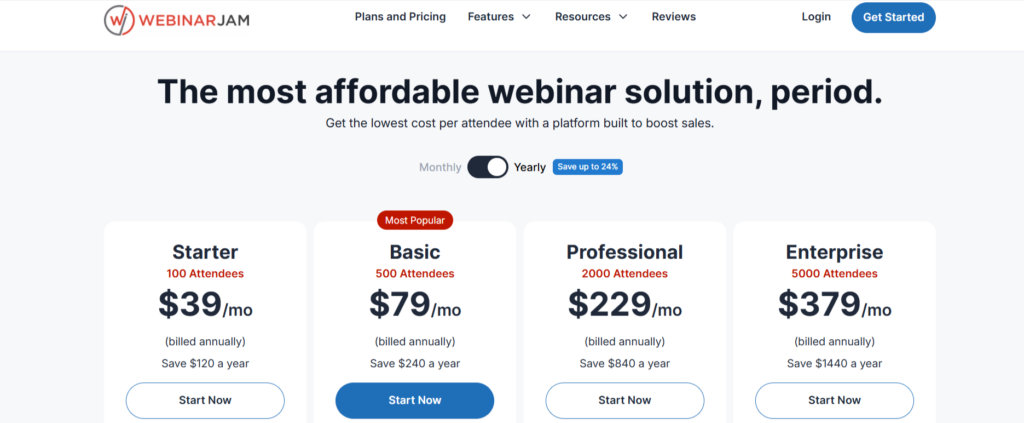
Paying annually brings the monthly rate down and can save you $120 to $1,440 per year compared with paying month to month.
| Plan | Annual Rate | Annual Cost | You Save |
|---|---|---|---|
| Starter | $39/month | $468/year | $120/year |
| Basic | $79/month | $948/year | $240/year |
| Professional | $229/month | $2,748/year | $840/year |
| Enterprise | $379/month | $4,548/year | $1,440/year |
New users can also test WebinarJam for $1 before paying the regular subscription price, giving you a low-cost way to try the platform first.
WebinarJam Starter Plan
The WebinarJam Starter plan costs $49 per month or $39 per month with annual billing. It supports up to 100 attendees, 1 host, and 1-hour webinars, making it suitable for creators, coaches, and small businesses running smaller live events.
Starter plan includes:
- Unlimited webinars
- Live chat, polls, and surveys
- Customizable registration pages
- Email and SMS notifications
- Live offer displays
- On-screen whiteboard
- Video injections and custom backgrounds
- Facebook and YouTube broadcasting
- A/B split testing
- Attendee spotlight
- Always-on live room
- Panic button and control panel
Best For:
Starter works well for coaches, course creators, small businesses, and new webinar hosts who expect fewer than 100 attendees and mainly want to run live sessions.
WebinarJam Basic Plan
The WebinarJam Basic plan costs $99 per month or $79 per month with annual billing. It supports up to 500 attendees, 2 hosts, and webinars lasting up to 2 hours.
The plan also includes 5 additional team members and EverWebinar access.
Basic Plan Includes:
- Up to 500 attendees per webinar
- 2 webinar hosts
- Webinars up to 2 hours long
- 5 additional team members
- Unlimited webinars
- Live chat, polls, and surveys
- Customizable webinar pages
- Email and SMS notifications
- Live offers and calls to action
- A/B split testing
- Attendee spotlight
- Always-on live room
- Panic button and control panel
Best For:
Basic works well for course creators, coaches, marketers, and growing online businesses that need more room than Starter provides.
The 500-attendee limit and 2-hour session length give you enough space for product demos, training webinars, presentations, and live Q&A sessions.
With support for 2 hosts, you can also run webinars with a co-presenter or have one person manage the session while another delivers the presentation.
WebinarJam Professional Plan
The WebinarJam Professional plan costs $299 per month or $229 per month with annual billing. It supports up to 2,000 attendees, 4 hosts, and webinars lasting up to 3 hours.
You also get 10 additional team members and EverWebinar access with this plan.
Professional Plan Includes:
- Up to 2,000 attendees per webinar
- 4 webinar hosts
- Webinars up to 3 hours long
- 10 additional team members
- EverWebinar access
- Unlimited webinars
- Live chat, polls, and surveys
- Live offers and calls to action
- Customizable webinar pages
- Email and SMS notifications
- A/B split testing
- Attendee spotlight
- Always-on live room
- Panic button and control panel
Best For:
The Professional plan is a good fit for businesses, established creators, and marketing teams that need more capacity than the Basic plan provides.
Its 2,000-attendee limit works well for larger product launches, training events, and webinars promoted to bigger audiences.
Webinar Duration:
You can run each webinar for up to 3 hours, giving you more time for workshops, detailed training sessions, multi-part presentations, and longer Q&A sessions.
Host Limit:
Professional allows up to 4 hosts per webinar. This makes it easier to run panel discussions, invite multiple instructors, or switch between speakers during larger online events.
WebinarJam Enterprise Plan
The WebinarJam Enterprise plan costs $499 per month or $379 per month with annual billing. It supports up to 5,000 attendees, 6 hosts, and webinars lasting up to 4 hours.
The plan also includes 25 additional team members and EverWebinar access.
Enterprise Plan Includes:
- Up to 5,000 attendees per webinar
- 6 webinar hosts
- Webinars up to 4 hours long
- 25 additional team members
- EverWebinar access
- Unlimited webinars
- Live chat, polls, and surveys
- Customizable webinar pages
- Email and SMS notifications
- Live offers and calls to action
- A/B split testing
- Attendee spotlight
- Always-on live room
- Panic button and control panel
Best For:
The Enterprise plan suits large companies, SaaS businesses, conference organizers, and media companies that regularly host webinars for thousands of attendees.
It can be used for company-wide training, customer events, large product presentations, and multi-speaker online events.
Team Access:
Enterprise includes 25 additional team members, giving larger teams more room to divide webinar responsibilities. Presenters, moderators, technical staff, and other team members can work together when managing larger events.
Webinar Duration:
Each webinar can run for up to 4 hours, making the plan suitable for longer workshops, conferences, training programs, and events with several sessions or speakers.
These are the main WebinarJam pricing plans, and the right choice depends on your audience size, webinar goals, and how often you host sessions. If the standard price feels high, using a WebinarJam coupon can help you to save 40% on any plan.
What Features Are Included In Each WebinarJam Plan?
Let’s compare the features of each WebinarJam pricing plan.
| WebinarJam Feature | Starter | Basic | Professional | Enterprise |
|---|---|---|---|---|
| Unlimited Webinars | ✔️ | ✔️ | ✔️ | ✔️ |
| Automated Webinars | ❌ | ✔️ | ✔️ | ✔️ |
| Attendees per Webinar | 100 | 500 | 2,000 | 5,000 |
| Hosts Included | 1 | 2 | 4 | 6 |
| Max Webinar Duration | 1 hour | 2 hours | 3 hours | 4 hours |
| Live Chat and Q&A | ✔️ | ✔️ | ✔️ | ✔️ |
| Webinar Recording | ✔️ | ✔️ | ✔️ | ✔️ |
| Call to Action Offers | ✔️ | ✔️ | ✔️ | ✔️ |
| Broadcast to Facebook and YouTube | ✔️ | ✔️ | ✔️ | ✔️ |
| Always-On Live Room | ❌ | ❌ | ✔️ | ✔️ |
| Panic Button | ❌ | ❌ | ✔️ | ✔️ |
| Control Panel | ❌ | ❌ | ❌ | ✔️ |
Does WebinarJam Offers Refund?
WebinarJam offers a 30-day money-back guarantee on paid plans, starting after the free trial ends and the account moves to a paid subscription.

Here is how the WebinarJam refund policy works:
- Refund requests must be submitted within 30 days of the payment date
- The guarantee applies only to first-time plan purchases
- Renewals, repeat payments, and upgrades are not covered
- Refund requests must go through official WebinarJam support
This policy lets you test WebinarJam after the trial and request a refund if it does not meet your needs.
Does WebinarJam Offer Free Trial In 2026?
Yes, WebinarJam offers a 14-day trial for just $1, giving users full access to the platform before committing to a paid subscription.
Unlike a limited demo, the trial includes the same core features available on paid plans, allowing you to evaluate the software in real-world conditions.
During the 14-day trial, you can:
- Host live webinars using the full platform.
- Invite real attendees to public or private events.
- Engage audiences with live chat, polls, and Q&A sessions.
- Record webinars and access replay functionality.
- Test the platform’s performance, reliability, and ease of use.
If you want to create a branded registration page or connect WebinarJam with your existing site, working with a website developer can make the setup smoother and help deliver a more polished experience for your attendees.
This low-cost trial is a practical way to determine whether WebinarJam meets your webinar marketing and online event needs before upgrading to a full plan.
Conclusion
This WebinarJam pricing guide should help you compare the plans and choose one based on your audience size, number of hosts, and webinar requirements.
WebinarJam works well for sales webinars, online training, product demos, and lead-generation campaigns. You can start with a plan that meets your current needs and upgrade later if your audience grows or you need higher limits.
For regular users, annual billing offers better savings than paying month to month. Before subscribing, you can also check for an available 40% off WebinarJam coupon to see if you can get an additional discount on your purchase.
FAQs on WebinarJam Pricing
How Much Does WebinarJam Cost Per Month?
WebinarJam starts at $49 per month for the Starter plan, $99 per month for the Basic plan, $229 per month for the Professional plan, and $499 per month for the Enterprise plan.
Is WebinarJam Worth the cost?
How Many Attendees Does WebinarJam Allow?
WebinarJam supports 100 to 5,000 attendees per webinar, depending on the plan you choose. Starter allows 100 attendees, Basic supports 500, Professional increases the limit to 2,000, and Enterprise supports up to 5,000 attendees.
Can I Host Multiple Webinars At The Same Time?
Yes, WebinarJam lets you schedule and run multiple webinars simultaneously. For smoother broadcasts and reliable webinar recordings, it is a good idea to leave 15–30 minutes between sessions whenever possible.